
Your calendar wasn't built to run a mobile team.
Windoflo is a field scheduling tool — built for teams who perform defined, repeatable tasks on site. Not a meeting calendar designed for boardrooms. Not a project management tool that also does bookings.
One purpose, done properly — get your people to the right place, at the right time, with the right information to complete the job.
Built for teams that work on site
If your team travels to scheduled appointments and performs structured, repeatable work — Windoflo is built for you.
What changes in week one
The day stops being held together by phone calls.
Nobody rings the office for an address
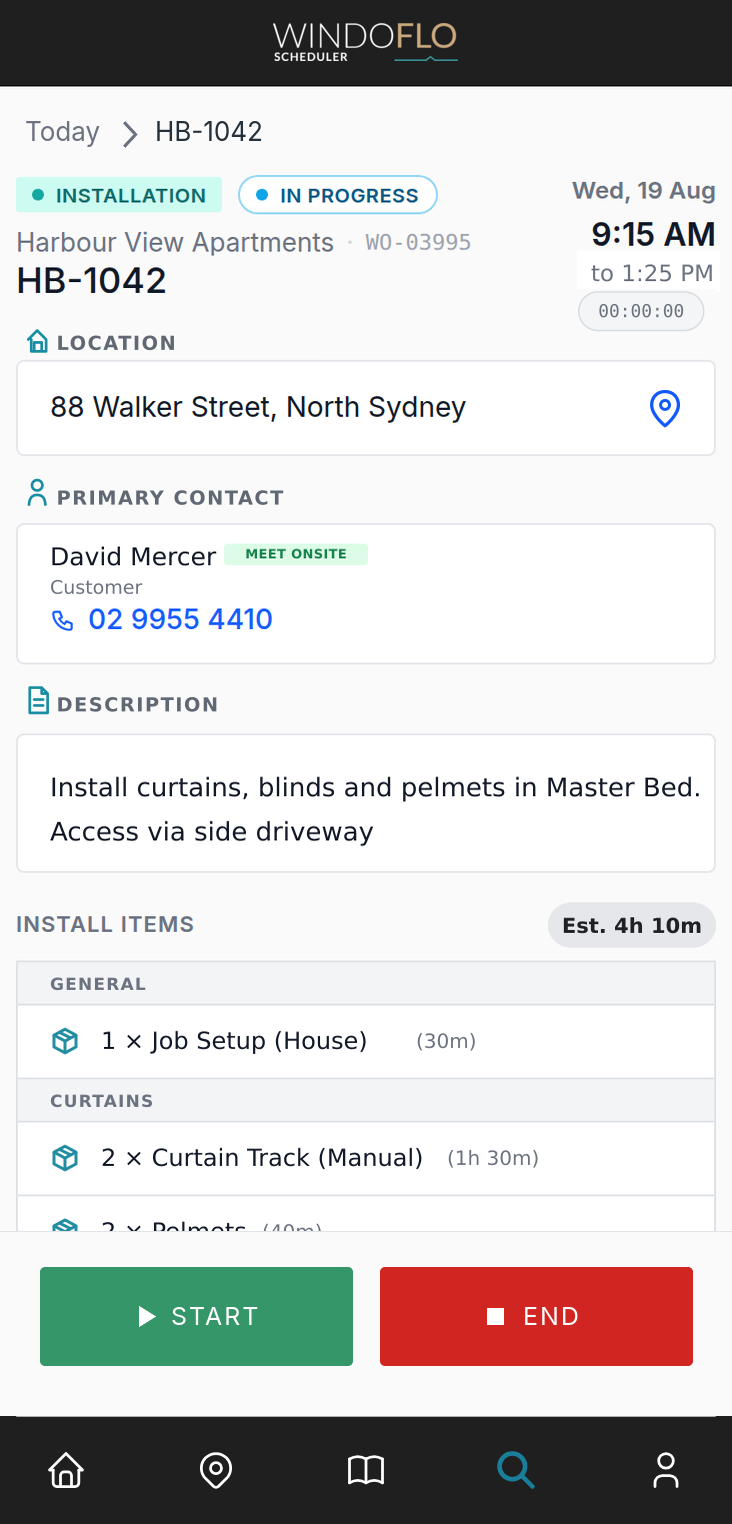
The site address, access notes, contact details, and job scope are all on the work order, on the phone, before anyone heads out for the day.
The 4pm job stops running late
Drive time between stops is part of the plan rather than an afterthought, so a day that looks full on the calendar is a day that actually fits.
Paperwork lands before the team leaves site
The completion report is submitted on site with photos and notes attached, and is in the office inbox while the team is still packing up.
WORK ORDER
A/C service call
Bookings that calculate themselves.
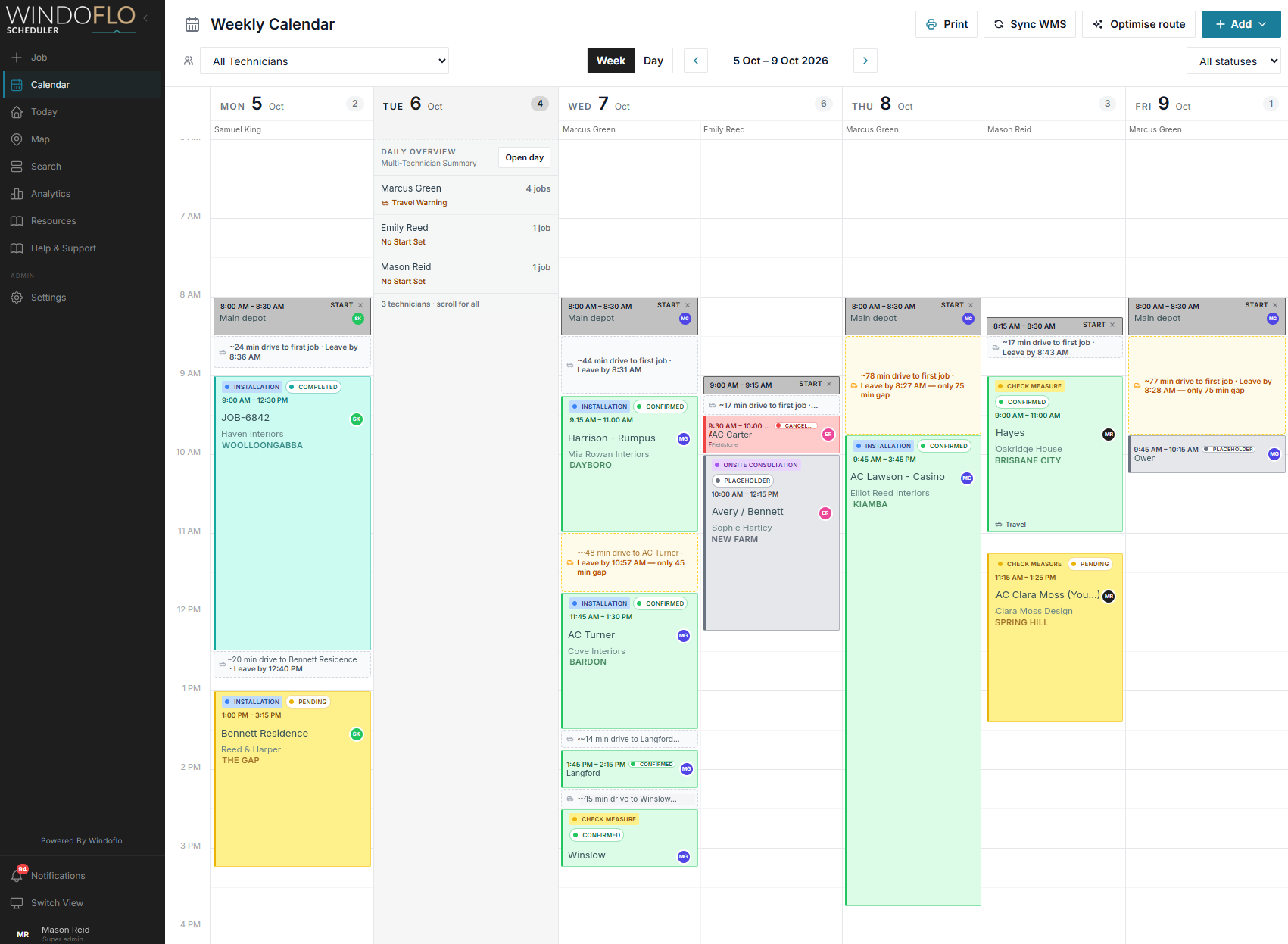
Windoflo is built around a simple idea: if your work is structured and repeatable, your schedule should calculate itself. Most scheduling tools let you block out a time slot and hope the duration is right. Windoflo works differently. Build a library of your standard work tasks — each with a set duration — and when a booking is created, the system calculates how long the job will take based on what's actually being done.
No guessing. No "how long should this one take?" questions. The schedule is accurate before the day starts.
- Reusable work task library
- Job duration auto-calculated from task quantities
- Consistent booking times across your entire team
- New staff book with the same accuracy as experienced staff
Stop guessing travel times.
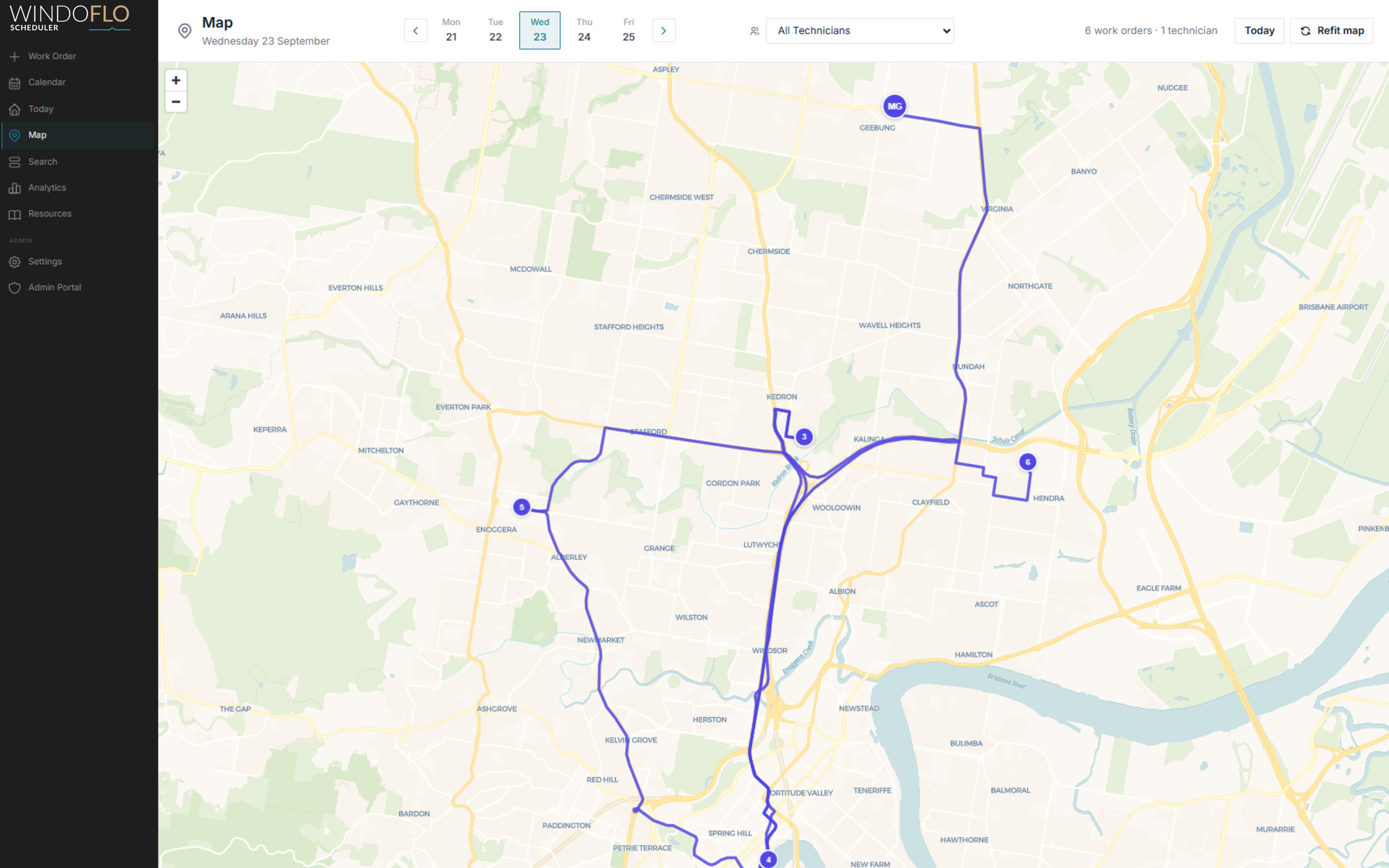
A job isn't just the two hours on site. It's the 45-minute drive across town first. Windoflo uses Google Maps to calculate real drive time estimates between jobs and defined Start and End locations, so you never overbook a day.
Not sure the best route? The Windoflo route optimiser finds the best sequence for the day — minimising windscreen time and keeping the schedule tight.
- Real drive time estimates calculated via Google Maps
- Automated route optimisation across the full day
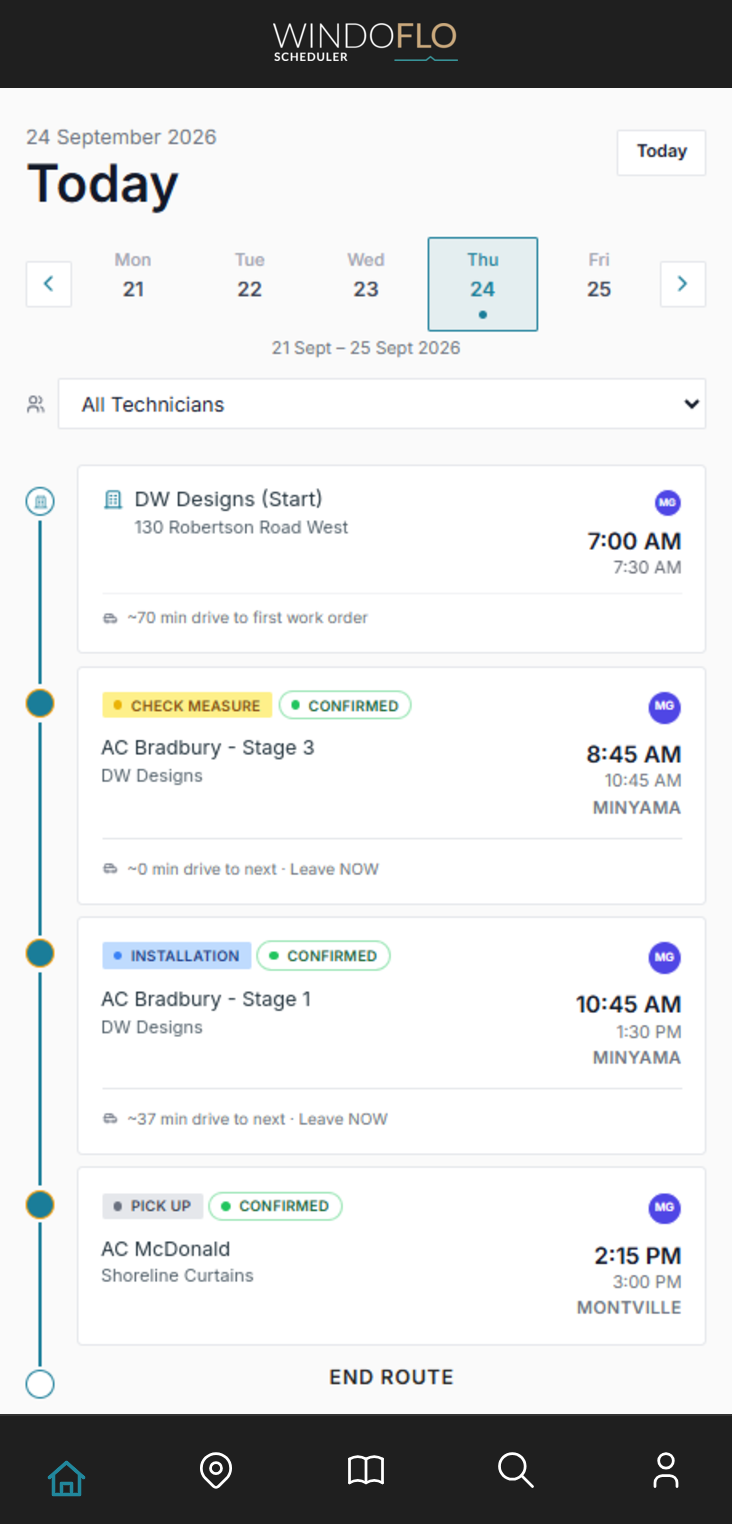
- "Leave by" prompts and notifications for technicians
- Drag-and-drop calendar makes reshuffling easy
- Customisable job types and statuses
Only available in countries supported by Google Maps. Coverage and live traffic data may vary by location.
The job runs on the phone.
Your team is rarely at a desk. The Windoflo app gives them everything they need: today's route, work order details, checklists, photos and documents.
If reception drops, cached schedules and work order details remain readable. Actions that need a connection wait until the technician is back online.
See how a typical day works →One work order. Zero phone calls.
No more texting addresses or calling the office for job details. The work order is the source of truth.
Clear locations
Detailed site addresses with map links, contact info, and special access instructions right at the top.
Itemised work
Break down the job by task and location. Each item includes time estimates — so the team knows exactly what's expected before they arrive.
Photo proof
Technicians snap completion photos directly into the app. They're attached to the job history permanently.
Done means done.
When a job finishes, the technician hits complete. Customisable completion reports are instantly emailed to the office, complete with notes, checklists, and photos. No waiting for end-of-day paperwork.
END WORK ORDER
Installation report
Work order status
Checks completed on site
Customer experience
CLIENT SIGN-OFF
Customer acceptance
Is the customer satisfied with the completed work?
Customer name
Customer signature
Signed on site at 2:42 PM
Know what the day is telling you
See where time goes — and where you can win it back.
Windoflo turns everyday scheduling activity into a clear operating picture. Track work volume, completion rates and travel time, then see how route optimisation changes the result.
- Overview metrics without spreadsheets
- Daily workload and completion trends
- Travel comparisons and route savings
Analytics
14 Sep 2026 – 18 Sep 2026
Scheduled
16
3.2 avg / day
Completed
14
2.8 avg / day
Cancelled
2
0.4 avg / day
Completion rate
88%
Scheduled Work Orders
Drive time
11h 58m
2h 24m avg / day
Planned distance
918.0km
183.6km avg / day
Time Save (Route Optimised)
2h 15m
27m avg / day
Avg Between Jobs
32m
40.6km avg dist
Daily Volume
14 Sep 2026 – 18 Sep 2026
One day, start to finish.
From the office planning the schedule to the completion report landing back in the inbox — the whole day in six steps.
- 1
Plan the schedule
Build tomorrow on the calendar with auto-calculated job durations and drive times between every stop.
- 2
Drive the route
The team opens Today and sees their run sheet, drive times, when to leave, and a map view of their entire route.
- 3
Prepare at the depot
The pick-up checklist shows exactly what to collect for each job before anyone leaves.
- 4
Work the site
Work items, checklists, access notes, photos and attachments stay with the work order.
- 5
Complete on site
Your own report questions, answered and submitted before they drive off.
- 6
Hand back
The office sees the update and the completion report is emailed automatically.
Everyone knows where things stand.
Configurable notifications keep the office and the field in sync. Technicians get prompted before a job is due to start. The office gets flagged if a job is running late or hasn't been started. No chasing, no checking in — the schedule tells you when something needs attention.
HB-1042 · Harbour View Apartments – 9:15 AM
HB-1042 · Harbour View Apartments – due at 9:15 AM, not yet started
Built alongside a working business, not in a boardroom.
Windoflo was built inside a real field operation — solving scheduling problems we lived with every day. We'd rather show you the product than a wall of borrowed logos.
See how Windoflo fits your industryWhat Windoflo doesn't do.
We don't quote. We don't invoice. We're not your project management system. Your business already has tools for that.
Windoflo plugs into your workflow — it doesn't try to replace it. No feature bloat, no modules you'll never open, no paying for capabilities you already have somewhere else.
Pricing
$35/month + GST
Covers your business and first technician. Each additional technician is $10 a month + GST.
All prices are in AUD and exclude GST. Monthly, no lock-in, no setup fee.
No work-order limits. No feature tiers. Every team gets everything.
Work out your priceReady to run your mobile team properly?
Fourteen days free, no credit card. Set your company up this afternoon and schedule tomorrow properly.